ChatGPT Dots use cases: 14 jobs to hand over, with prompts
Fourteen jobs to hand your dot today: the prompt to copy, the apps it needs, the rule to set, how long it runs and what comes back, with real results.
Last verified
On this page
A dot is worth having when you hand it a whole job: something to watch, research, draft or build, with the result brought back to you. Here are fourteen that work, each with the prompt to copy.
#Pick a job
Start from what you have. Every card on the shelf jumps to its recipe further down the page.
#Inbox and calendar
These three jobs read your mail and calendar and write nothing without you. They need Gmail connected. Apps and permissions shows how.
Morning briefing
The first job to hand over. Your dot asks which time zone you mean, then runs one straight away.Apps it needs: GmailGoogle CalendarWhen it runs: Every day at 7:00. The first one arrives in about 5 minutes
Every morning at 7am, send me a briefing with:
1. My calendar for the day
2. The emails that actually need my attention
3. Anything that looks like a problem
Keep it short and scannable. Run one right now so I can see what it looks like.A message headed "Morning brief" with three parts: Calendar, Email needing attention and Problems to check. Each item links to the email it came from.
A first briefing looks like this. The personal lines are blurred, and the three headings are the ones the prompt asked for.
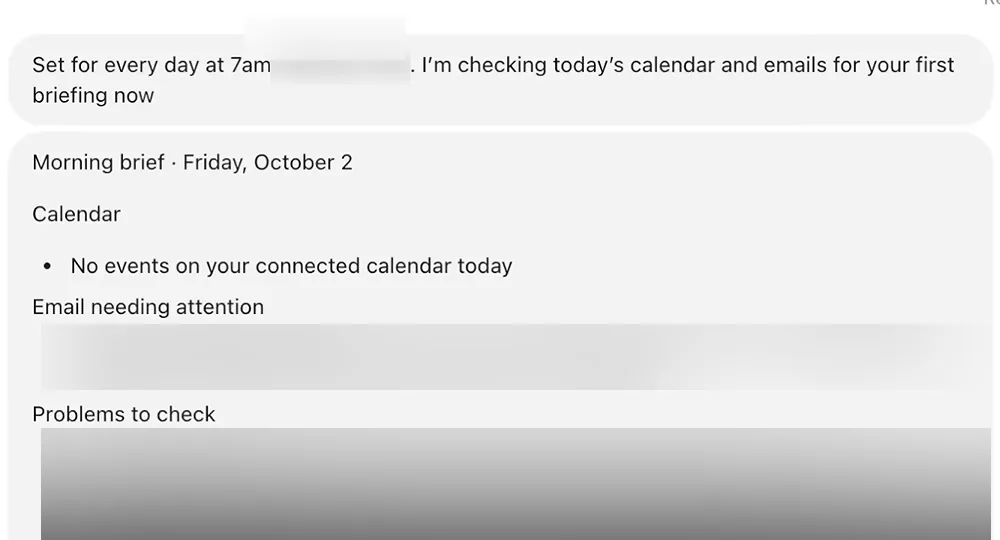
- The schedule is confirmed in words.
- The first briefing, a few minutes after the request.
When a single email needs an answer, ask for a draft.
Draft the reply, don't send it
Your dot reads the original email first, so the draft answers what was asked.Apps it needs: GmailWhen it runs: Once. A few minutes
Help me draft a response to [name] from [company]. I want more information so I can decide whether I'm interested.
Save it as a draft in Gmail. Don't send it.The draft in your conversation, and a link to the same draft sitting in the Gmail thread. Your dot says it's saved and not sent. You press Send.
Your inbox is also the place to look something up.
Find the receipt and the policy
Good for warranties, refunds and renewals: one answer from the company's public policy and from your own mail.Apps it needs: GmailWhen it runs: Once
I lost my [device]. Is there a warranty for it? Search my email for the receipt, check what the warranty covers, and tell me what a claim looks like.What the policy covers, with a link to it. A dated list of the emails it found. One next step.
#Watching
A dot can keep checking something after you've stopped thinking about it. Neither of these jobs needs an app: your dot uses the browser on its own computer.
Watch a web page for changes
For a competitor's pricing page. Asking for the first check now shows you the baseline your dot will compare against.Apps it needs: No app neededWhen it runs: Every day. The first check comes back in about 7 minutes
Check this pricing page every day: [link]
Record every plan and its current price. Each day, compare against the last check and alert me only if something changes.
Run the first check right now and show me the current prices.The current prices, written out. A row marked Monitoring under Recent activity in your dot's profile. After that, a message only when something changes, with the before and after.
The same idea works for anything that's listed for sale or rent.
Watch listings and alert on new ones
For flats, cars, jobs, tickets. Say what counts as a match and ask for a page, so every result is in one place.Apps it needs: No app neededSpaceWhen it runs: Every hour
Look through [site or kind of site] for [what you want] in [place], between [price] and [price]. Show me the top three now.
Then check every hour for brand new listings and notify me only when something new fits.
Track all the results in a new page called [name], and add to it on every check.Three picks with links, prices and what still needs checking. A page that holds every listing. Then alerts like the two below.
Each alert says what's new, what the seller claims and what you should check yourself.
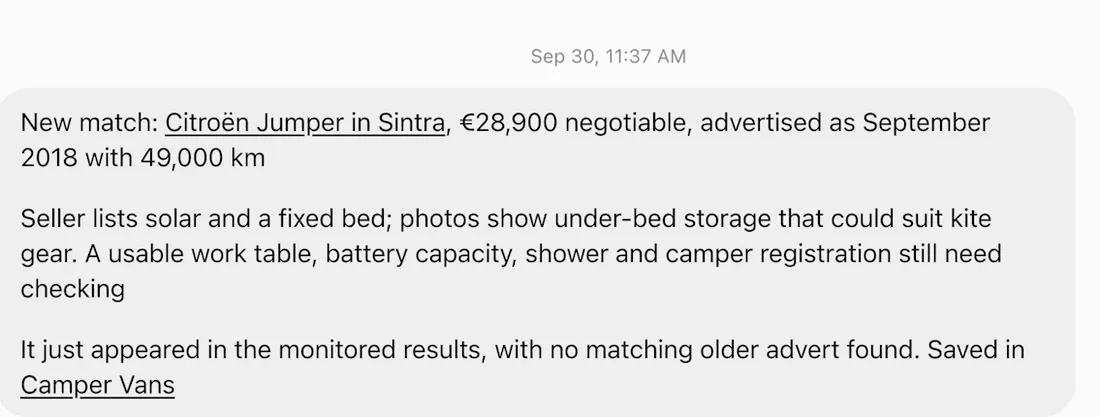
- The listing is a link.
- The alert is also saved to the tracker page.
If your dot says the interval you asked for isn't supported, take the one it offers.
#Research
Research jobs come back in minutes. Ask for the form you want the answer in, and your dot tells you what it couldn't check.
Research, delivered as a document
Ask for a document when you'll want to keep the result or pass it on.Apps it needs: No app neededWhen it runs: Once. About 20 minutes
Research what's trending in [your field] this week: new launches, big updates, and what people are talking about on YouTube, X, and Reddit.
Turn it into 10 ideas in a doc. For each idea include:
- A clickable title
- Why it's trending right now (with the source)
- A one-line hook
Rank them from strongest to weakest.Two or three progress notes, then a Word file in the conversation and under Outputs in your dot's profile.
Look at the last two messages in this result: the file, and a plain statement of what wasn't verified.
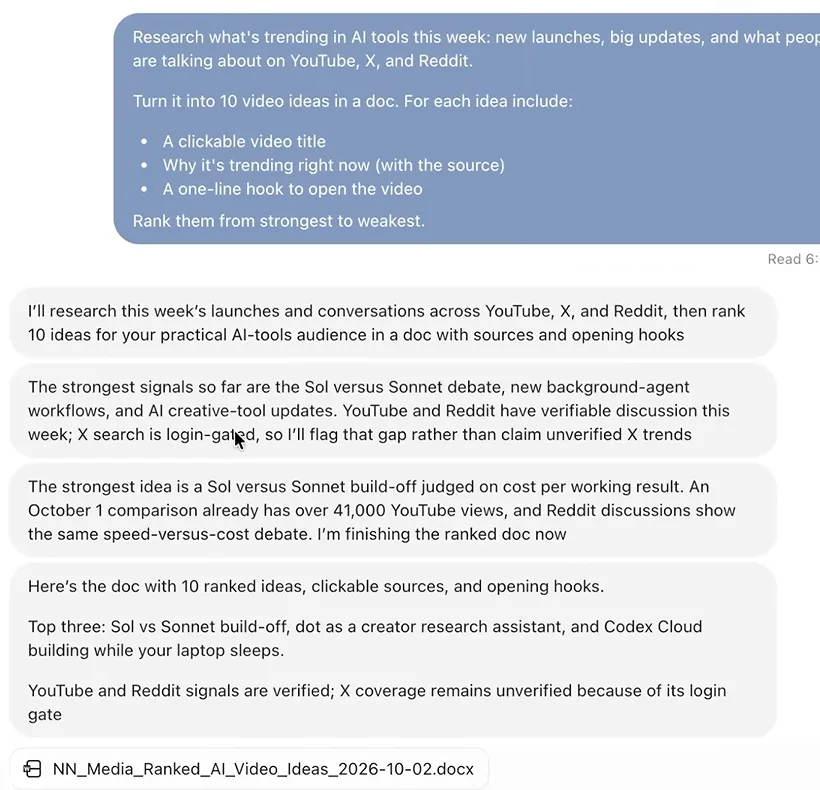
- The request lists what each idea must include.
- Your dot says what it couldn't check.
- The document. Click it to read it beside the chat.
Research can also mean reading what your own team wrote.
Where does this Slack channel stand?
The answer comes to your conversation in ChatGPT. Nothing is posted in Slack.Apps it needs: SlackWhen it runs: Once. Under a minute
Read through the #[channel] channel in Slack and tell me where the project stands:
- What's done
- What's in progress
- Where things are stuck
- Who is waiting on whom
- Any deadlines at risk
Keep it to a short summary. Don't post anything in the channel.A summary under those five headings, plus anything odd your dot noticed, such as a date that names the wrong weekday.
To repeat it, reply "Do this every 3 days and send me the update." Then open your dot's profile and check that the row under Recent activity shows the rhythm you asked for.
For research that ends in a booking, let your dot take it as far as it can without paying.
Plan a trip, up to the pay button
Your dot compares, recommends and fills in what it can. It asks before typing your personal details into a booking form, and it doesn't buy.Apps it needs: No app neededWhen it runs: Once. About 20 minutes
Plan a three-night trip to [city], [dates]. Find somewhere to stay, a direct flight with an aisle seat and a carry-on, and things to do.
Compare the options, tell me your pick and why. Don't buy anything.Two places to stay with prices, review evidence and cancellation terms, one it rejected and why, a day-by-day plan, and a flight taken as far as the passenger form.
#Making things
When the result is a file, a page or a set of posts, your dot brings the finished thing back to the place you asked for it.
Update the weekly deck from a sheet
Attach the deck as an editable PowerPoint file. Your dot can't edit a PDF and will ask for the original.Apps it needs: Google DriveWhen it runs: Every Monday
This is our weekly numbers deck. Every Monday, update it with the latest week from my "[sheet name]" Google Sheet.
Flag any metric that changed by more than 15%.
Do the first update right now.The updated deck as a file, with a new slide for the flagged metrics showing the old and new values. A row under Recent activity with the weekly timing.
A dot can also publish what it builds.
Build and publish a web page
For a landing page, an event page, a one-page plan.Apps it needs: No app neededWhen it runs: Once. A few minutes
Build a one-page landing page for [product]. Use this copy: [paste it].
Make it clean, dark and mobile-friendly, with a [Join free] button. Publish it and send me the link.A link to a live page on a chatgpt.site address. The page is private to you until you ask your dot to change its sharing.
If your dot is in Slack, you can hand over a bigger piece of work there and get it back in the same thread.
Two weeks of social posts, from Slack
Send this as a direct message to your dot in Slack. Connect Slack first.Apps it needs: SlackWhen it runs: Once. About 20 minutes
The [campaign] brief is confirmed. We need two weeks of social content leading into the launch.
Decide what the mix should be, including carousels, and give me a posting schedule.
Draft everything so I can review before anything goes out.A reply in the thread with the recommended mix, a dated schedule, a review PDF and a zip of every asset.
This delivery ends with the sentence to look for in any job that makes things for other people.
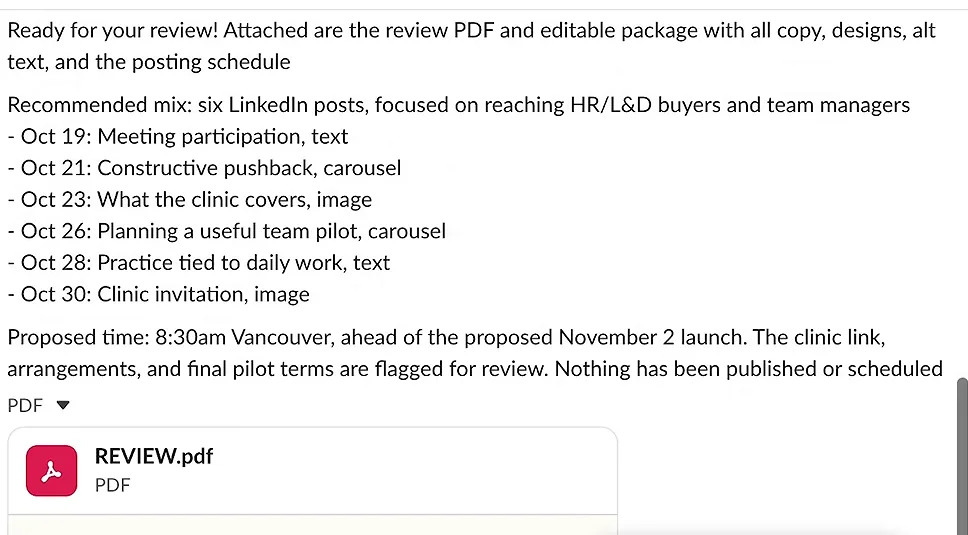
- The schedule, one line per post.
- "Nothing has been published or scheduled."
- The files arrive in the thread.
#Projects and code
These jobs run on your own computer, or run for weeks. Give your dot the goal and say what must come back to you.
Find and fix the bugs in a web app
Your dot opens the app in your computer's browser, tests it, and reports before it touches a file.Apps it needs: Your computerWhen it runs: Once. The report comes back in about 7 minutes
We've had feedback that the UI of this app looks off: [address]
Open it, check the layout at different screen sizes and test the main flows for bugs.
Bring me the issues before you change anything.A prioritised list of bugs, what passed, and the question "Want me to fix these issues and rerun the checks?" Say yes and your dot fixes them, keeps a backup of the original files, and reports what it verified.
If you already have a Codex thread building something, your dot can run it for you.
Manage a Codex project for you
Your dot finds the thread on your connected computer, sends it instructions and tests what it builds.Apps it needs: Your computerSpaceWhen it runs: Keeps going until you stop it
Do you see the Codex thread I started on my [computer] about [project]? Please read the original conversation I had with that thread, so you know the goal.
Can you act as my project manager and keep working with that Codex thread to build it out? Prompt it to build things, then you test them.
Maintain a Space that includes all your updates and everything you've done, with screenshots.
When you hit big milestones, give me an update.A summary of the thread to confirm it's the right one. Then a Space with a status page and subpages, and a message at each milestone.
The last recipe hands over a responsibility with an end date.
Keep a launch on track
Attach the plan, the drafts and your standards. The three rules decide what your dot does alone and what it brings to you.Apps it needs: No app neededWhen it runs: Daily checks until the date you give
Our goal is to keep our [launch] on track through launch day, [date]. Everything you need is in these files: [what they are].
On track means everything we put out matches our positioning, nothing misses its date, and you bring me anything that needs my call.
Add three Custom Rules:
Draft anything, but never send or post anything without my OK.
Never change a price or offer a discount.
Anything that could move the launch date comes to me first.The problems it found in your files, one or two questions, daily morning checks until launch day, and a review pack as a Word file.
A few messages into that job, follow the price mismatch from the top of the picture to the bottom.
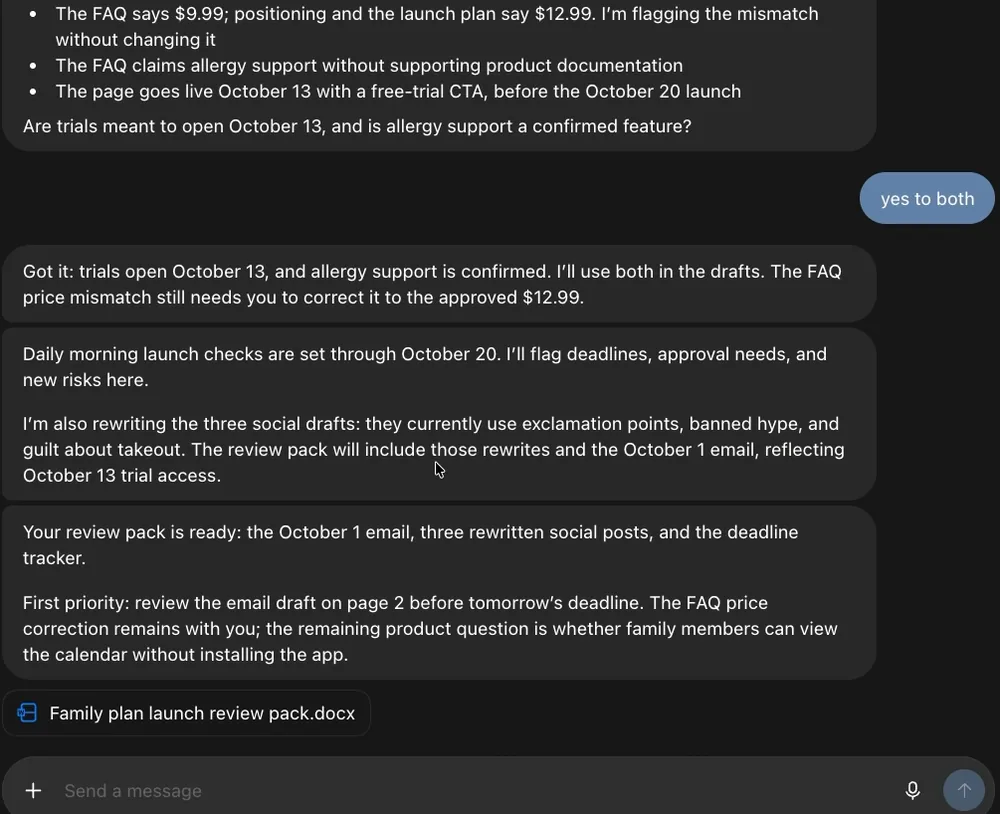
- The rule at work: your dot found a wrong price and didn't change it.
- It set up its own daily checks.
- The review pack.
#Check you've got it
One line of this prompt will make the job stop and wait for you. Tap it.
- Find flights from New York to Dubai for next month, around the 15th.
- Compare the best three options side by side.
- Then book the best one.Paying is a step your dot asks about, and typing your details into the airline's form is another. Ask for the comparison and decide yourself.
- Tell me which you'd pick and why.
Show the answer
Then book the best one. Paying is a step your dot asks about, and typing your details into the airline's form is another. Ask for the comparison and decide yourself.
Can my dot buy things for me?
It can buy with a card you've already saved on a shop's website, and only with your approval. Some shops block the browser on your dot's cloud computer. Amazon is one. For those, connect your computer and your dot uses your browser.
Can it fix bugs and open pull requests?
Yes. With GitHub connected, your dot can look into an issue and prepare a pull request for you to review. Coding tasks it starts in Codex count toward your Codex usage. Connect GitHub
A file didn't arrive. Where is it?
When an attachment fails to upload, your dot says so. Ask it to save the file to your connected computer, or to put the content in a page.
Do these jobs use up my ChatGPT limits?
Talking to your dot doesn't. Work your dot hands to ChatGPT Work or Codex counts toward those limits. Usage limits
- Rebuilt as fourteen recipes with prompts to copy.
- First published.
Get the Dots cheat sheet
One page with the essentials, plus new guides as they are published. Free.
You're in. Your cheat sheet is ready. Download the PDF

Sources
12
- OpenAI docs: Tasks and memory learn.chatgpt.com
- OpenAI docs: Connect computers and apps to your dot learn.chatgpt.com
- OpenAI Help Center: Dots privacy, security, and safety FAQs (purchases and approvals) help.openai.com
- Zinho Automates on YouTube: screenshots of a morning briefing and a research document youtube.com
- The AI Advantage on YouTube: screenshot of a new-listing alert youtube.com
- Grace Leung on YouTube: screenshot of a delivery in Slack youtube.com
- Skill Leap AI on YouTube: screenshot of a launch review pack youtube.com
- Taha El Harti on YouTube: recorded jobs (inbox search, bug review) youtube.com
- Pat Simmons on YouTube: recorded jobs (trip planning) youtube.com
- Alex Finn on YouTube: recorded job (managing a Codex thread) youtube.com
- The AI Advantage on YouTube: recorded job (rental alerts) youtube.com
- WPerfolg on YouTube: recorded job (a reply saved as a Gmail draft) youtube.com