ChatGPT Dots pricing: what a dot costs on every plan
A dot comes with ChatGPT Pro from $100 a month or a Business Premium seat at $100 to $125. Work out your bill and the cheapest way to get one where you live.
Last verified
On this page
A dot has no price of its own. It comes with ChatGPT Pro, from $100 a month, or with a Business Premium seat at $100 per user per month billed annually ($125 billed monthly).
#Work out your cost
Start with your own bill.
#What does each plan cost?
The calculator works from this price list. The last column says which plans come with a dot.
Plans and prices in US dollars
| Plan | Price | Billing | Dot included |
|---|---|---|---|
| Free, Go, Plus | $0, $8, $20 a month | Monthly | No |
| Pro 100 | $100 a month | Monthly only | Yes |
| Pro 200 | $200 a month | Monthly only | Yes |
| Pro 500 | $500 a month | Monthly only | Yes |
| Business, Standard seat | $20 per user annual, $25 monthly | Annual or monthly | No |
| Business, Premium seat | $100 per user annual, $125 monthly | Annual or monthly | Yes |
| Enterprise, Edu, Healthcare | Agreed with OpenAI sales | By contract | Partial |
Three things sit behind every "Yes":
- Pro includes a dot only outside the EEA, the UK and Switzerland.
- You have to be 18 or over.
- Enterprise is "Partial" because dots stay off until a workspace admin turns them on.
Can I get Dots? checks your own case in three taps.
#What does paying more buy?
Five rows in that table say "Yes" or "Partial", at very different prices. Every plan that includes a dot includes the same one. Paying more buys more of everything around it.
OpenAI doesn't publish how much dot work each plan includes. Start on the cheapest plan that gives you a dot and move up only if you hit a limit. Usage limits shows what a limit looks like.
#Business: the dot comes with the Premium seat
Pro is priced per person. Business is priced per seat, and a workspace has two seat types: Premium includes a dot, and Standard doesn't.
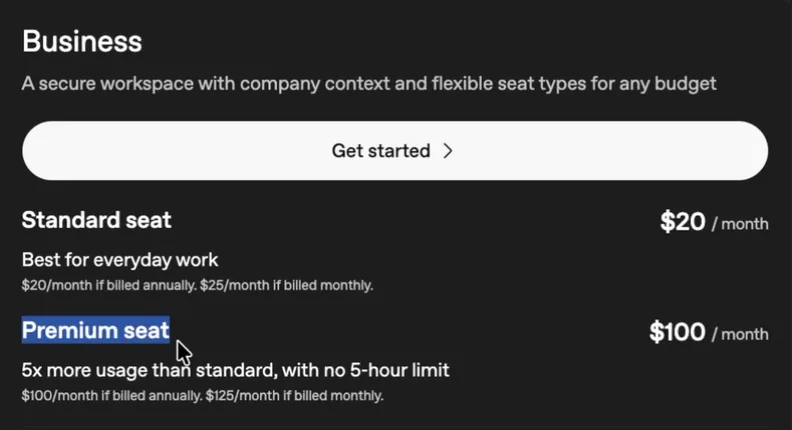
- Standard: $20 billed annually, $25 billed monthly. No dot.
- Premium: $100 billed annually, $125 billed monthly. One dot.
The rules for seats:
- A workspace needs at least 2 seats: 2 of either type, or 1 of each.
- You can mix seat types, and an owner can switch a member's seat in workspace settings.
- Annual billing charges the year up front.
Put your own team into the calculator.
#What can cost extra?
The plan covers your dot. It doesn't cover everything your dot sets in motion. One question to check you've got the difference.
Your dot hands a coding job to Codex. Whose usage does that job count against?
- Nobody's. Everything a dot does is covered by the plan
- Your normal Codex usage
- A separate allowance that only dots use
Show the answer
Your normal Codex usage
Talking to your dot doesn't count toward your ChatGPT usage limits. A task your dot starts in Work or Codex counts toward those products' limits, the same as if you'd started it. On Pro, you can buy credits to keep using Work and Codex when the included usage runs out.
Talking to your dot doesn't count toward your ChatGPT usage limits. A task your dot starts in Work or Codex counts toward those products' limits, the same as if you'd started it. On Pro, you can buy credits to keep using Work and Codex when the included usage runs out.
Usage limits shows which work lands on which meter.
#Next step
You know the price. Before you pay it, make sure the plan includes a dot where you live.
How much does a second dot cost?
OpenAI hasn't set a price. Today it's one dot per person. More dots, more speed and more monthly work are planned as add-ons for a flat monthly fee.
Does my dot's work use up my plan's usage?
For the first month after launch, dot usage doesn't count toward your plan's allowance. After that, each plan gets its own usage terms. Tasks your dot starts in Work or Codex count toward those products' limits as usual.
Are prices the same outside the US?
These are US dollar list prices. Prices vary by country and currency, so check chatgpt.com/pricing while signed in before you budget.
- Rebuilt around the calculator, with pictures of OpenAI's pricing page.
- First published.
Get the Dots cheat sheet
One page with the essentials, plus new guides as they are published. Free.
You're in. Your cheat sheet is ready. Download the PDF

Sources
12
- OpenAI Help Center: About ChatGPT Pro tiers help.openai.com
- OpenAI Help Center: ChatGPT Business overview help.openai.com
- ChatGPT pricing page chatgpt.com
- ChatGPT Business page chatgpt.com
- OpenAI docs: Pricing learn.chatgpt.com
- OpenAI Help Center: Getting started with your dot help.openai.com
- OpenAI: Introducing dots openai.com
- OpenAI docs: Meet dots learn.chatgpt.com
- OpenAI Help Center: ChatGPT release notes help.openai.com
- OpenAI Help Center: Manage dots in ChatGPT workspaces help.openai.com
- The Register: a flat monthly fee for future add-ons theregister.com
- The AI Advantage on YouTube: screenshot of the Business seat prices youtube.com