ChatGPT Dots limits: what's free and what uses your plan
Dots aren't unlimited. Chatting with your dot is free, its own work runs on a hidden allowance, and Work or Codex tasks it starts use your plan's usage.
Last verified
On this page
Dots aren't unlimited, and chatting with your dot doesn't touch your other ChatGPT usage. Your dot's own work runs on a separate allowance. Only the tasks it starts in Work or Codex come out of your plan's usage.
#Where does this get counted?
Your dot can do the same job two ways: by itself, or by handing it to Work or Codex. Who does the work decides the meter. Try it.
#What a stop looks like, and what to do
Two of those meters can run out without warning. OpenAI doesn't publish the size of your dot's allowance, and ChatGPT shows no meter for it, so you find the edge when your dot stops. Match what you see to its row, then go to that section.
| You see | Which meter ran out | First move |
|---|---|---|
| "Your dot is on a break" | Your dot's allowance | Wait, then send one message |
| "You’ve hit the preview limit" | Your dot's allowance | Ask your dot for the retry time |
| 0% left under Usage | Your plan's Work and Codex usage | Check the reset time |
#"Your dot is on a break"
The first stop is the loud one. Your dot answers every message with the same line, in the conversation, like a normal reply.
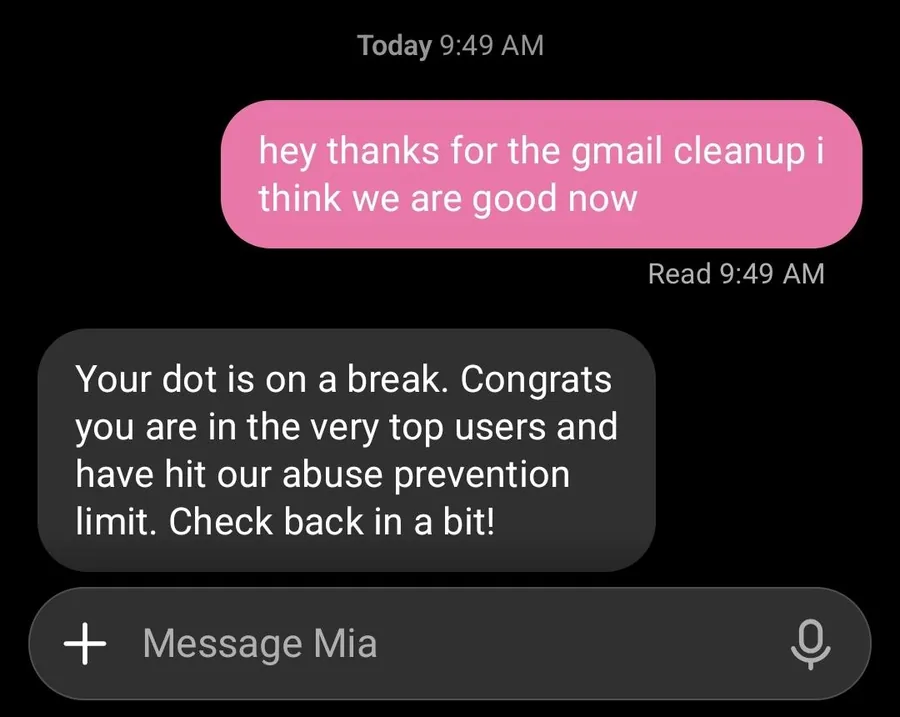
- Your message is delivered and read as usual.
- The reply gives no time. Asking "when?" gets the same line again.
The same stop also arrives as "Your Dot is resting. Congratulations on being one of the most active users! You have reached our usage limit to prevent abuse. Come back in a while!"
- Stop messaging your dot. Every message gets the break line back.
- Come back later and send one message.
- When your dot answers normally, tell it to carry on, because it won't always resume by itself: "Pick up the job you were on before the break. Tell me where you left off and what's still to do."
Can't wait? Run the job yourself in Work or Codex. That's a different meter, so the break doesn't block it.
#"You’ve hit the preview limit"
The second stop is quiet. Your dot's work halts mid-job and the error lands in the task, so the conversation may show nothing: your messages are marked read and no reply comes. Ask, and your dot quotes it.
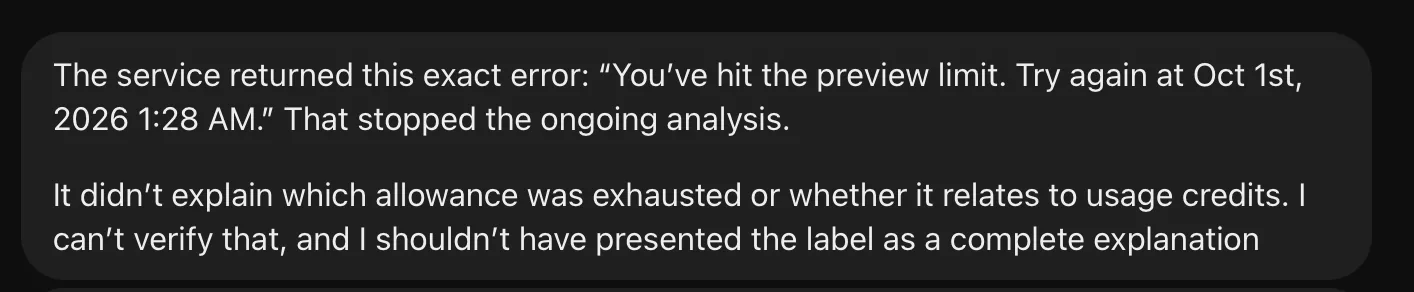
The exact text is You’ve hit the preview limit. Try again at 11:05 AM., with the time your dot can start again. A longer wait shows a date as well.
- Ask your dot: "What stopped your last task? Quote the exact error and the retry time."
- Wait until the retry time. If your dot is still stopped then by your clock, give it a few more hours.
- Tell your dot to pick the job back up.
No answer at all? Your dot is still stopped. Leave it a few hours and ask again.
#0% left on your plan's usage
The third stop is on the one meter you can watch. At 0%, Work and Codex tasks won't start, including the ones your dot tries to open.
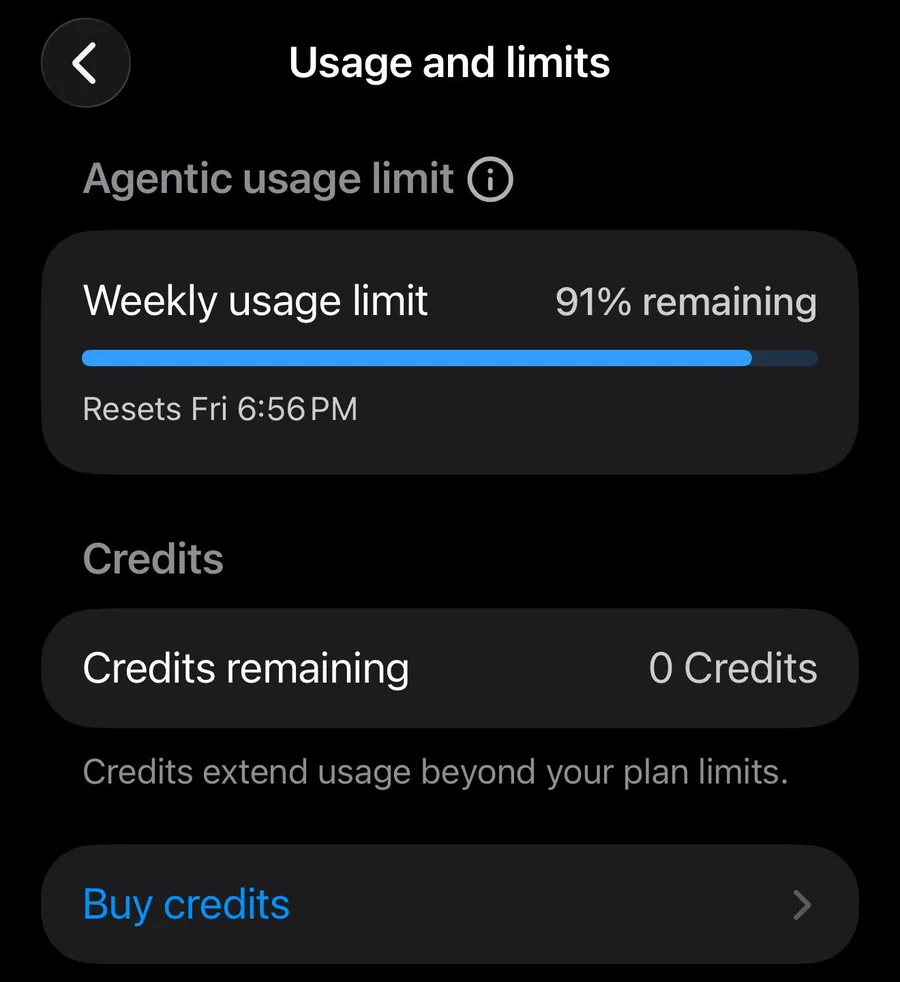
- What's left of your plan's Work and Codex usage this week.
- When the meter refills.
- Credits extend usage past your plan's limit.
- Read the reset time. In the desktop app, click your picture at the bottom left of the sidebar and read the Usage row.
- Wait for the reset, or choose Buy credits if you're on Pro. OpenAI support can't reset a limit for you.
- Keep using your dot. Chatting and its own cloud work are on other meters, so ask it to do the job itself: "Do this yourself on your cloud computer. Don't start a Work or Codex task for it."
Check the Usage row before and after your dot's first few big jobs. If the number dropped, your dot handed part of the job to Work or Codex.
#Keep your dot off your plan's usage
You can stop that third meter draining without your say. Your dot decides how to do a job, and it can open a Work or Codex task without mentioning it. One custom rule makes it ask first: go to Settings, Personalization, Custom rules, click Add, paste the rule below and set it to Ask before taking action.
Ask for my approval before you start any Work or Codex task.A rule is an instruction your dot tries to follow, and it can slip, so keep an eye on Usage for the first week. Two ways to spot a handed-off task after the fact:
- In the conversation: a chip with a laptop icon and the task's title.
- In your dot's profile: the Activity list shows what it has delegated.
Custom rules shows each screen.
#Check you've got it
One job, three possible meters.
You ask your dot to tidy a PowerPoint file that lives on your laptop. Which meter does the work count on?
- None: chatting is free
- Your dot's allowance
- Your plan's usage
Show the answer
Your plan's usage
The file is on your computer, so your dot opens a Work or Codex task there, and those count as usual. The same slides edited with its own cloud tools would stay on your dot's allowance. Here's a dot explaining the difference:
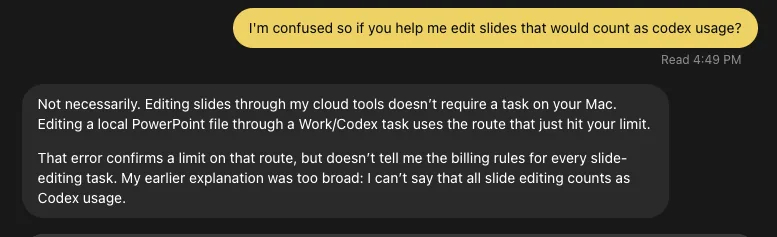
The file is on your computer, so your dot opens a Work or Codex task there, and those count as usual. The same slides edited with its own cloud tools would stay on your dot's allowance. Here's a dot explaining the difference:
What happens after the first month?
The extended limits are for the first month after launch. OpenAI will then set usage terms for each plan. Until then, treat today's headroom as temporary: if a daily job only works because your dot's allowance is generous right now, note what it would cost as a Work or Codex task.
How many dots and computers can I have?
One dot per person, and it can run several tasks in parallel. Only one of your own computers can be connected to your dot at a time.
Can I buy more usage for my dot?
Not yet. Credits extend Work and Codex usage on Pro. OpenAI plans to let you add more dots and raise a dot's monthly amount of work later.
Can I choose which model my dot uses?
No. A dot runs on GPT-6 Astra, and model settings, yours or your workspace's, don't apply to it. A Work or Codex task your dot starts has its own model setting inside that task.
Do speed modes use more of my plan's usage?
In Work and Codex, yes. On Pro, Fast mode uses your usage at 2.5 times the Standard rate. GPT-6 Astra Ultrafast, on Pro 500 only, uses it at 8 times.
- Rebuilt around the meter tool and real pictures of each stop.
- First published.
Get the Dots cheat sheet
One page with the essentials, plus new guides as they are published. Free.
You're in. Your cheat sheet is ready. Download the PDF

Sources
16
- OpenAI: Introducing dots (the usage rules) openai.com
- OpenAI Help Center: ChatGPT release notes (first-month usage terms) help.openai.com
- OpenAI Help Center: Getting started with your dot (allowance for deeper work, local tasks) help.openai.com
- OpenAI docs: Tasks and memory (task types and where they run) learn.chatgpt.com
- OpenAI docs: Get started with your dot (delegating to Work or Codex) learn.chatgpt.com
- OpenAI docs: Control your dot (custom rules) learn.chatgpt.com
- OpenAI Help Center: About ChatGPT Pro tiers (speed modes, credits, limit resets) help.openai.com
- OpenAI Help Center: Manage dots in ChatGPT workspaces (model settings) help.openai.com
- Reddit r/OpenAI: screenshot of the on-a-break message reddit.com
- Reddit r/codex: screenshot of the preview limit error reddit.com
- Reddit r/codex: the preview limit and the resting message reddit.com
- Reddit r/OpenAI: screenshot of the Usage and limits screen reddit.com
- Reddit r/codex: a custom rule for Codex tasks reddit.com
- Reddit r/codex: screenshot of a dot explaining which route used Codex usage reddit.com
- OpenAI community forum: a preview limit that showed only in task records community.openai.com
- Zinho Automates on YouTube: the Usage row in the account menu youtube.com